Over the past few weeks, I’ve been interviewing a lot of candidates. One thing that kept coming up is that with AI writing more and more of our code, developers are losing touch with how systems actually execute underneath. People easily drop buzzwords like multithreading, multiprocessing, and async, but the lines between them get blurry fast.
I wanted to break them down with practical, runnable examples and visual traces so you can build an intuitive mental model of how each one actually works.
Prerequisites: Python 3 and viztracer (pip install viztracer or uv add viztracer).
Table of Contents
The Core Foundations
Before jumping into code, let’s establish a clear baseline of the terms we’ll be using.
Key Concepts
Concurrency: Two or more tasks make progress by taking turns over the same period of time. They interleave their execution rather than running at the exact same physical instant.
Parallelism: Two or more tasks execute at the exact same physical instant across separate CPU cores.
Python GIL (Global Interpreter Lock): A lock built into standard Python (CPython) that allows only one thread to execute Python code at a time. Even if your computer has 16 CPU cores, Python threads cannot run Python calculations in parallel because of this lock.
ThreadPoolExecutor: A built-in Python tool (from concurrent.futures import ThreadPoolExecutor) that creates and reuses a group of worker threads inside your current program so you don’t have to create threads by hand.
ProcessPoolExecutor: A built-in Python tool (from concurrent.futures import ProcessPoolExecutor) that creates separate operating system processes. Because each process gets its own Python instance, it completely bypasses the GIL and runs in true parallel across multiple CPU cores.
What is a Process?
Think of a process as an independent, running application on your computer (like running a Python script or opening a browser).
Each process gets its own private memory and system resources. Process A cannot directly see or touch the memory of Process B. Every process starts with at least one thread.
What is a Thread?
A thread is an individual worker inside a process that executes code line by line.
A single process can spin up multiple threads, and here is the key rule: all threads inside the same process share that process’s memory. This means any thread can directly read and change the same variables as another thread.
Note: That’s why every standard Python script automatically starts inside a
MainThread.
Kernel-Level Threads vs. User-Level Threads
To understand why threads and async behave differently in Python, consider who manages the scheduling:
Kernel-Level Threads (OS Threads) are created and scheduled directly by the operating system kernel. This is what Python’s threading module and ThreadPoolExecutor use. On a multi-core machine, the operating system can execute multiple kernel threads in true parallel across separate CPU cores. The OS preemptively pauses and switches threads when there are more active threads than available CPU cores, or when a thread blocks on I/O. Automatic scheduling is handled by the OS, but each thread incurs real memory overhead (stack space), and managing thousands of threads creates high context-switching overhead.
User-Level Threads (Green Threads / Coroutines) are managed entirely in user space by the application runtime, without kernel intervention. The runtime or event loop controls when to switch execution between tasks. This gives extremely low memory overhead, allowing tens of thousands of concurrent tasks on a single thread. However, because scheduling is cooperative, a task running an unyielding CPU-heavy operation blocks all other tasks on that thread.
Where Does Gevent Fit In?
When discussing user-level threads in Python, gevent is the most well-known implementation.
gevent implements user-level green threads called greenlets on top of a single OS thread. Instead of asking the operating system to create new threads, gevent manages execution cooperatively inside the Python process using an internal event loop based on libev or libuv.
The core mechanism of gevent is monkey patching. By calling gevent.monkey.patch_all(), gevent dynamically replaces standard blocking Python modules (such as socket, ssl, and time.sleep) with non-blocking greenlet versions at runtime.
This allows developers to write standard, synchronous-looking code without async or await keywords. When a greenlet performs a blocking call like time.sleep() or makes a network request, gevent automatically yields control behind the scenes, allowing another greenlet to run on the same thread while waiting for I/O.
Before Python introduced native asyncio and async/await syntax in Python 3.4 and 3.5, gevent was the primary tool for building high-concurrency network services in Python. Today, it remains widely used in production web servers such as Gunicorn (using worker_class = "gevent") to handle thousands of concurrent client connections with synchronous application frameworks like Flask or Django.
The trade-off with gevent centers on monkey patching: modifying Python internals at runtime can cause unexpected edge cases when interacting with third-party C extensions or native libraries that expect real OS threads. Additionally, because execution is cooperative on a single thread, any CPU-heavy computation will block all other greenlets.
Async vs. Coroutine: What’s the Difference?
These two words get thrown around constantly in Python discussions, often interchangeably, which makes them sound much harder than they actually are. Here is the simplest way to untangle them:
Asynchronous (Async) is the overall design pattern. It simply means non-blocking: instead of sitting frozen while waiting for a network request, database query, or timer, your program goes off and does other useful work in the meantime.
A Coroutine is the actual Python construct used to achieve it. A normal Python function runs from top to bottom and exits; you cannot pause it halfway. A coroutine is a function with pause and resume capabilities. You define it with async def. When it hits an await statement (like waiting for network data or a timer), it pauses itself, saves its current execution state, and hands control back. When the data arrives, it resumes right where it left off.
Here is the trap that trips up almost every Python developer:
def regular_function():
    return "Hello"


async def coroutine_function():
    return "Hello"


result1 = regular_function()  # Runs immediately -> "Hello"
result2 = coroutine_function()  # Does NOT run! -> <coroutine object at 0x...>
When you call coroutine_function(), Python doesn’t execute its body yet. It gives you a coroutine object, a paused function waiting for an engine to run it.
To actually execute that coroutine, you need the other two pieces:
Event Loop (The Conductor): A single-threaded scheduler built into Python. It maintains a queue of coroutines. When Coroutine A pauses at await, the event loop immediately runs Coroutine B. When Coroutine A’s data arrives, the loop wakes Coroutine A back up and lets it continue.
Task (The Scheduled Job): When you pass a coroutine to asyncio.create_task(), Python wraps it in a Task and registers it directly with the event loop so it can start making progress in the background.
Practical Examples
To keep things fair and comparable, all our examples will simulate a slow 10-second task using time.sleep(10) and run two of them.
1. Multiprocessing (Separate Processes)
Let’s start by using ProcessPoolExecutor to run two tasks in separate processes:
import time
from concurrent.futures import ProcessPoolExecutor


def runner():
    time.sleep(10)


if __name__ == "__main__":
    with ProcessPoolExecutor(max_workers=2) as p:
        future1 = p.submit(runner)
        future2 = p.submit(runner)

        future2.result()
        future1.result()
Here is what the profiler trace looks like:
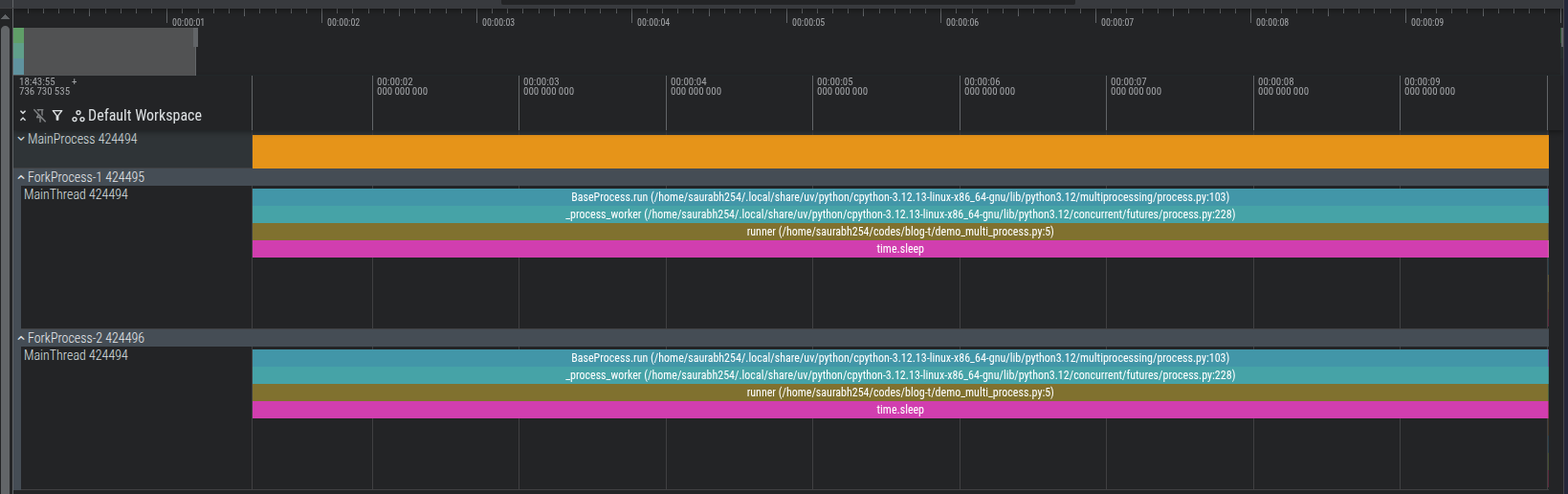
Looking at the trace, our initial process (MainProcess, PID 424494) asked the OS to fork two brand-new processes: ForkProcess-1 and ForkProcess-2.
Each child process gets its own PID, its own memory space, and its own Python interpreter. Because they are completely separate OS processes, they execute across different CPU cores in true parallel without competing for Python’s Global Interpreter Lock (GIL).
2. Multithreading (Separate Threads in a Single Process)
Now let’s do the exact same workload, but with threads instead of processes using ThreadPoolExecutor:
import time
from concurrent.futures import ThreadPoolExecutor


def runner():
    time.sleep(10)


if __name__ == "__main__":
    with ThreadPoolExecutor(max_workers=2) as t:
        future1 = t.submit(runner)
        future2 = t.submit(runner)

        future2.result()
        future1.result()
Here is what the profiler trace looks like:
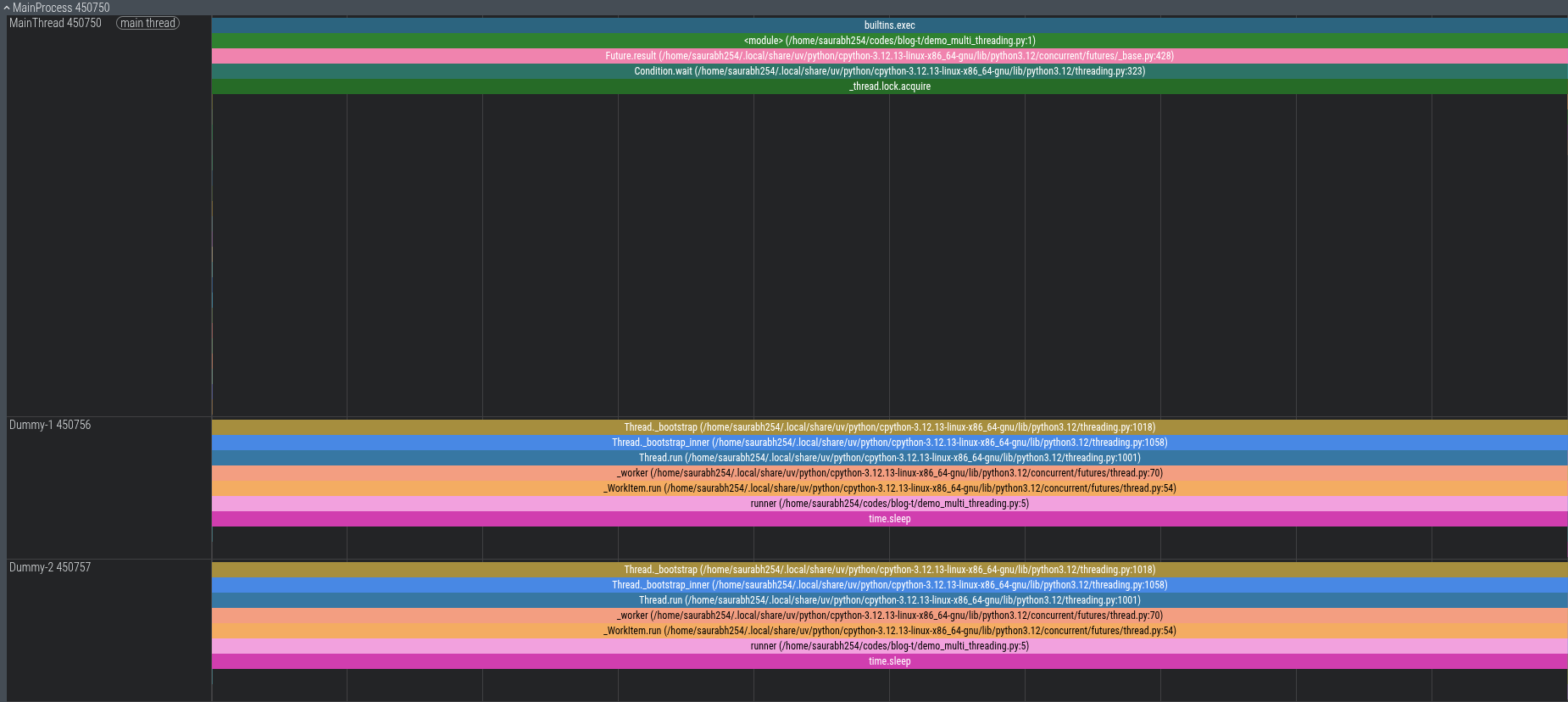
What changes here?
We stay inside a single OS process (MainProcess, PID 450750). There are no fork calls, no new PIDs, and no duplicated memory. The main thread submits both jobs and waits, while the pool creates two worker threads (Dummy-1 and Dummy-2) inside our existing process to run runner() concurrently.
Because time.sleep() releases Python’s GIL while waiting on the system timer, both threads sleep at the exact same time. The script finishes in ~10 seconds instead of 20, using far less memory than multiprocessing.
3. Combining Both: Multiple Threads Inside Multiple Processes
What happens if we put both together? We can spawn multiple processes, and have each process spin up its own thread pool.
Here is what that architecture looks like:
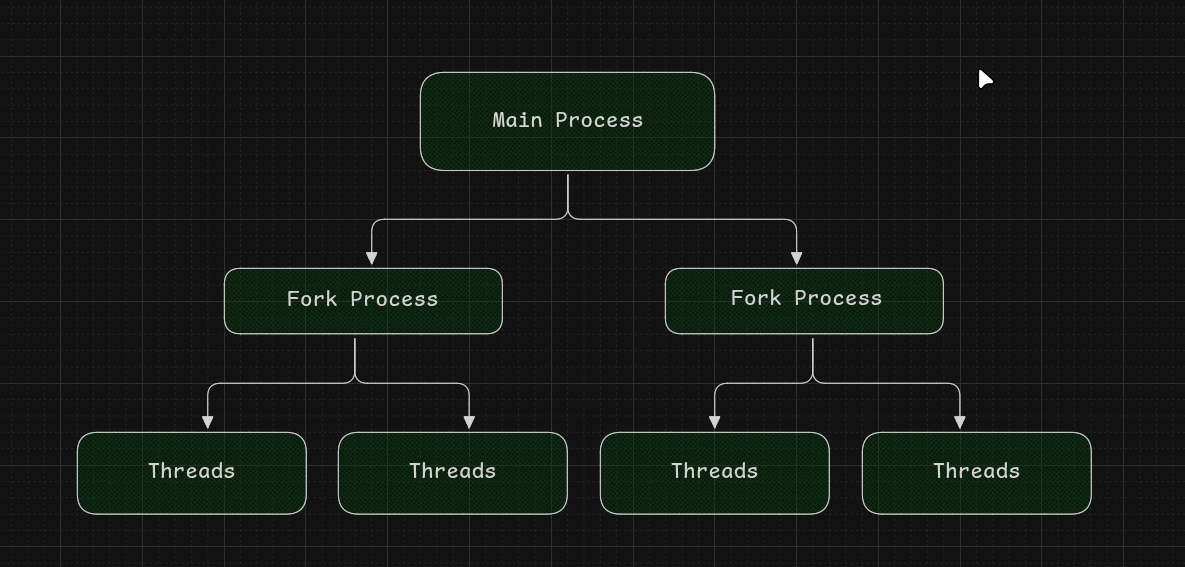
In code, each worker process runs threadTasks(), which spawns two threads:
import time
from concurrent.futures import ProcessPoolExecutor, ThreadPoolExecutor


def runner():
    time.sleep(10)


def threadTasks():
    with ThreadPoolExecutor(max_workers=2) as t:
        future1 = t.submit(runner)
        future2 = t.submit(runner)

        future1.result()
        future2.result()


if __name__ == "__main__":
    with ProcessPoolExecutor(max_workers=2) as p:
        future1 = p.submit(threadTasks)
        future2 = p.submit(threadTasks)

        future2.result()
        future1.result()
And here is the profiler trace:
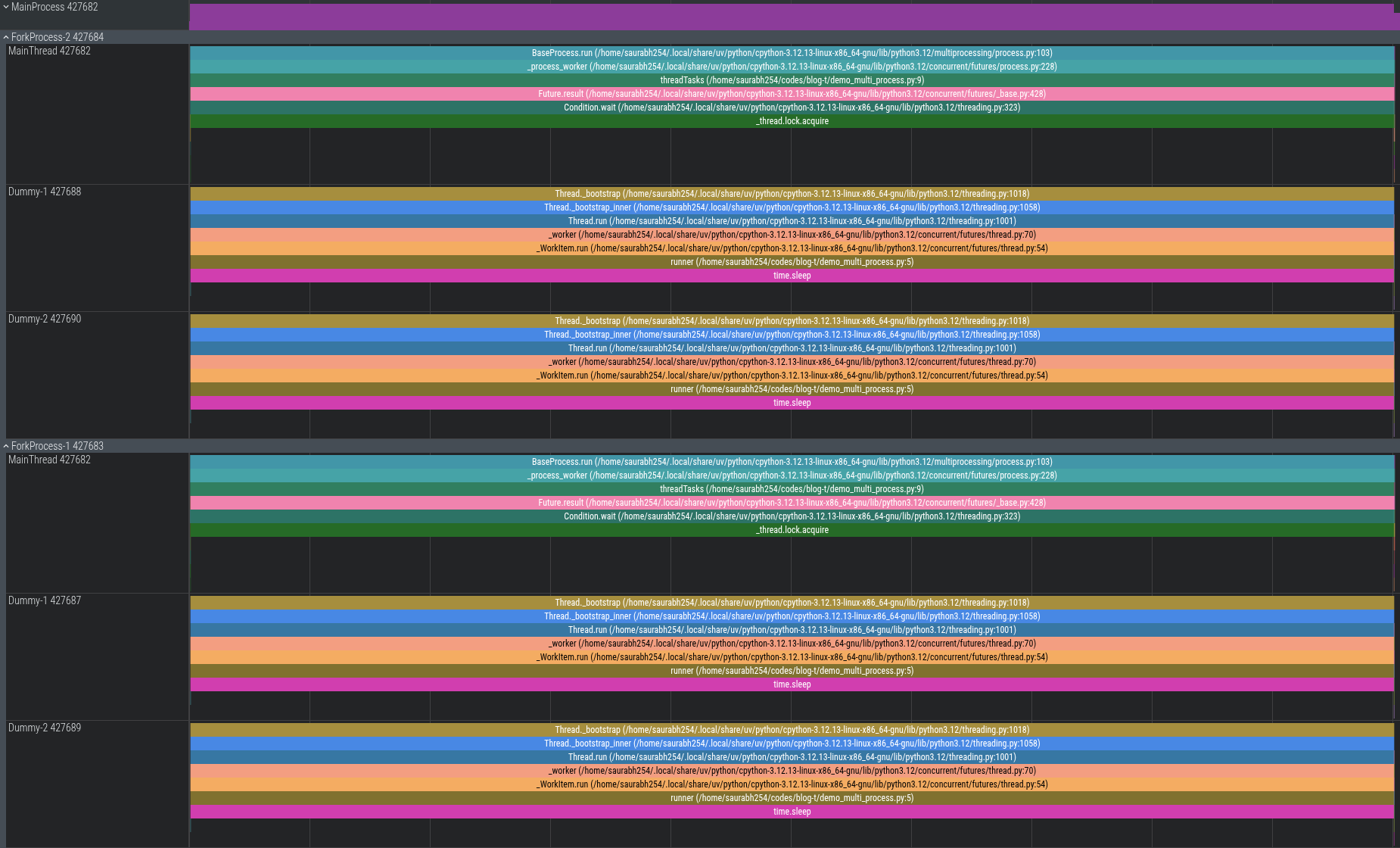
Inside ForkProcess-1, the main thread submitted both jobs and paused while two worker threads (Dummy-1 and Dummy-2) ran runner() concurrently inside that process’s memory. Over on another CPU core, ForkProcess-2 did the exact same thing in parallel.
The two processes run in true parallel across separate CPU cores, and inside each process, the threads share memory to run their own tasks.
Note: If you run this yourself and inspect the trace, you might see extra helper threads under the main process. Python creates these internally behind the scenes to manage the queue of jobs.
4. Asynchronous: Concurrency on a Single Thread
In all three examples above, we relied on the OS to schedule processes or threads. With asyncio, we don’t ask the OS for new threads or processes at all. Everything runs on one process on one single thread:
import asyncio
import time


async def runner(name: str, delay: float) -> None:
    print(f"{time.perf_counter():.3f} | {name} started")

    # Non-blocking wait: suspends this coroutine,
    # allowing the event loop to run other tasks.
    await asyncio.sleep(delay)

    print(f"{time.perf_counter():.3f} | {name} completed")


async def main() -> None:
    start = time.perf_counter()

    await asyncio.gather(
        runner("Task-A", 3),
        runner("Task-B", 2),
        runner("Task-C", 1),
    )

    print(f"Total elapsed: {time.perf_counter() - start:.2f}s")


if __name__ == "__main__":
    asyncio.run(main())
When we run it:
(blog-t) ➜  blog-t git:(main) ✗ uv run demo_async_process.py
70311.299 | Task-A started
70311.299 | Task-B started
70311.299 | Task-C started
70312.299 | Task-C completed
70313.300 | Task-B completed
70314.300 | Task-A completed
Total elapsed: 3.00 s
All three tasks started at the exact same millisecond (70311.299). Sequential execution would have taken 3 + 2 + 1 = 6 seconds, but here it took only 3.00 seconds, without spinning up any extra OS threads.
Frequently Asked Questions
How did the async code finish in 3 seconds on just one thread?
If there’s only one thread, how can three tasks make progress at once?
The secret is that the tasks take turns cooperatively using await.
When Task-A hits await asyncio.sleep(3), it doesn’t freeze your computer. It tells the event loop: “I’m waiting on a 3-second timer. Go run someone else while I wait.” The event loop immediately switches to Task-B, which also yields, and then to Task-C.
All three timers tick in the background. After 1 second, Task-C finishes and the event loop wakes it back up. A second later, Task-B finishes. Finally, Task-A completes.
The CPU wasn’t doing three calculations at the exact same physical microsecond: it just avoided sitting idle while waiting for timers.
Multithreading vs. Async: What’s the real difference?
Because of Python’s Global Interpreter Lock (GIL), only one thread can execute Python bytecode at a time. Neither threads nor async will run Python code in parallel across multiple CPU cores. Both exist primarily to handle I/O waiting (downloading web pages, querying databases, reading files).
The real difference comes down to how tasks are scheduled:
Multithreading (Preemptive Scheduling): The operating system kernel manages thread scheduling across CPU cores. When there are more active threads than available cores or when threads block on I/O, the OS automatically pauses one thread to give CPU time to another. In standard Python, the GIL restricts pure Python bytecode execution to one thread at a time, while the OS handles the actual thread management.
Pros: Works directly with standard synchronous libraries (like requests or SQLite) without code rewrites.
Cons: High memory overhead per thread (each thread allocates its own OS stack). Race conditions can occur when multiple threads access shared variables, requiring locks. Scaling to thousands of OS threads degrades performance due to kernel context-switching overhead.
Async (Cooperative Scheduling): The application runtime (the Python event loop) manages task switching in user space without OS intervention. Tasks yield control explicitly using await.
Pros: Highly scalable and lightweight. Tasks are small in-memory Python objects rather than OS threads. A single process can manage 10,000+ concurrent network connections with low RAM usage.
Cons: Requires an all-async call chain and async libraries (like httpx instead of requests). Any blocking synchronous function or long CPU calculation will block the single thread and stall all other tasks on the event loop.
When should you use which? (Decision Guide)
- Multiprocessing: Use for CPU-heavy work (data processing, machine learning inference, image manipulation, heavy math). Each process gets its own Python instance, giving you true multi-core parallel speed.
- Multithreading: Use for I/O waiting when working with existing synchronous libraries where rewriting everything to
async/awaitis not practical. - Async: Use for high-volume network I/O (web APIs built with FastAPI, WebSockets, scrapers, chat applications) where you need to handle thousands of concurrent requests cleanly on a single thread.
- Gevent: Use when deploying synchronous web applications (such as Flask or Django on Gunicorn) to handle high concurrent I/O traffic without rewriting your codebase to
async/await.